Walls & Insulation
Insulation Calculator — R-Value and Square Feet
Enter the area to insulate, the required R-value from your plan, and the selected product's exact R-value and package coverage to get a label check and whole-package quantity.
Formula tested · Local units · No sign-up
Project inputs
Enter measurements
Use your preferred units. Results update automatically.
Show the calculation methodFormula, conversions, rounding, and assumptions+
Net insulation area = gross area − openings or surfaces that will not receive this product. The selected cut/handling allowance is shown separately, then added to form the square footage to purchase.
Packages = purchase area ÷ the square-foot coverage printed on the exact package for the selected R-value. The calculator shows the unrounded result, then rounds up once to a whole package and reports the remaining coverage.
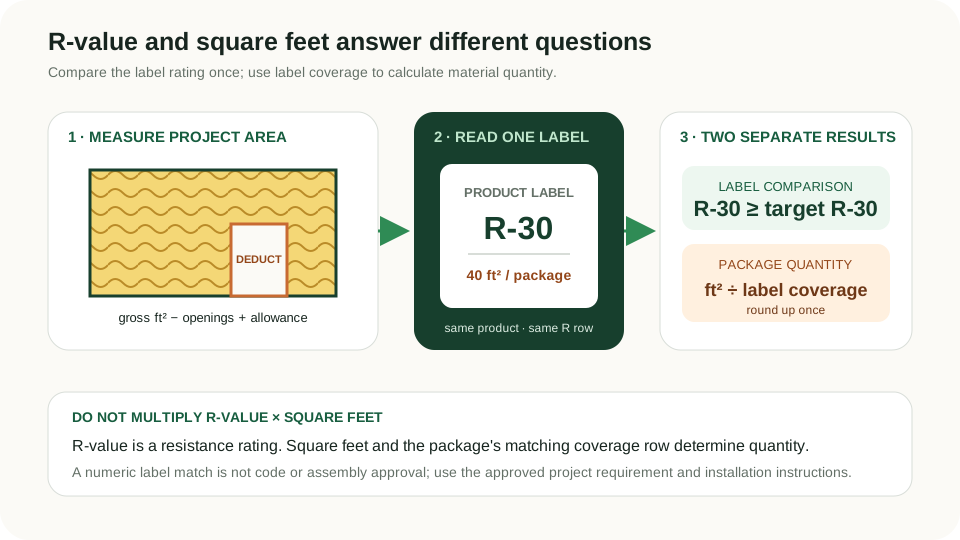
The product's labelled R-value is compared directly with the required R-value you enter. R-value means resistance to heat flow; it is a product or assembly rating, not a quantity to multiply by the number of square feet.
A numerical R-value comparison is not a compliance decision. Climate zone, building component, framing, continuous-insulation requirements, product fit, compression, air sealing, moisture control, and installation can all affect the approved assembly.
Real-world example
300 ft² area with a 10% allowance and 40 ft² packages
- A 20 ft × 15 ft rectangular surface has a gross area of 300 ft². The example has no deductions, so net area remains 300 ft².
- A user-selected 10% cut/handling allowance is 30 ft², making the coverage to purchase 330 ft².
- The selected example package states 40 ft² of coverage at R-30: 330 ÷ 40 = 8.25 packages.
- Round the package count up once: buy 9 packages. Those packages cover 360 ft², leaving 30 ft² after the calculated purchase area.
- The project target entered is R-30 and the selected product label is R-30, so the numerical label comparison is R-30 ≥ R-30. The calculator does not decide whether the assembly complies.
The example result is 9 packages and a matching numerical label target. The R-values, 40 ft² package coverage, and 10% allowance are example inputs—replace all three with approved project information and the exact product label.
Before you start
How to measure
- Identify one building surface and insulation product at a time. Walls, attic floors, cathedral ceilings, rim joists, and foundation assemblies can have different requirements and products, so do not combine them into one package calculation.
- For a rectangle, measure length × width. For an irregular surface, split it into rectangles, total their areas, and enter that total in known-area mode.
- Deduct only openings or surfaces that will not receive this product. Framing and cavities are assembly questions; use the net insulation area or takeoff method required by the project documents.
- Obtain the required R-value and any continuous/cavity split from the approved plan, energy documents, local code authority, or qualified professional. Do not choose it from a generic national table alone.
- Read both R-value and coverage from the same package label or fact sheet. For loose-fill products, use the coverage row for the exact target R-value and installed thickness; another row can produce a different bag count.
- Enter a cut/handling allowance only when appropriate to the selected product and project. None is inserted automatically.
Local guidance
Notes for United States
- This page is published for US projects because its label workflow is grounded in the FTC R-value Rule. It does not publish or infer a required R-value by ZIP code or climate zone.
- FTC guidance says higher R-value means greater resistance to heat flow, and covered home-insulation packages and fact sheets disclose R-value information. Coverage must come from the exact package rather than a generic material average.
- Batt and roll labels may list length, width, thickness, and square feet per package. Loose-fill charts can list different coverage and bag counts for different R-values; use one matching row.
- The optional cost uses only the package price and sales-tax percentage you enter. No product price, rebate, credit eligibility, or energy saving is assumed.
Quick reference
Inputs that belong in an insulation package takeoff
| Input | Get it from | What the calculator does |
|---|---|---|
| Gross and deducted area | Field measurements or approved takeoff | Produces net square feet for this product |
| Required R-value | Approved plan, energy documents, or local authority | Numeric target for a label comparison only |
| Product R-value | Exact package label or manufacturer fact sheet | Compared once with the entered target |
| Coverage per package | Same label/row as the product R-value | Converts purchase area into whole packages |
| Allowance | Project/product decision | Shown separately before package division |
| Price and tax | Current supplier quote and local rate | Optional user-entered material estimate |
Do not multiply R-value by square footage. R-value is the resistance rating; square footage and label coverage determine quantity.
Good to know
Common mistakes to avoid
- Multiplying R-30 by 300 ft² and treating 9,000 as a useful total. R-value is compared with the project target; it is not an area quantity.
- Using the package coverage for a different R-value or thickness, especially on a loose-fill coverage chart.
- Treating a product label equal to the target as proof that the full wall, roof, or floor assembly complies.
- Adding wall, attic, and foundation areas even though they use different products or R-value requirements.
- Ignoring openings or double-deducting framing when the project takeoff already supplies net cavity area.
- Assuming higher package count raises R-value. Buying more packages covers more area; installed R-value depends on the specified product, thickness, density, and installation.
- Rounding every room separately when one product order will cover the combined project. Sum compatible areas first, then round the package count once.
Need help?
Frequently asked questions
Is R-value measured per square foot?
No. R-value expresses resistance to heat flow and is compared with the required product or assembly target. Square feet determine how much insulation to buy using the package's stated coverage; the calculator deliberately keeps those two operations separate.
How many insulation packages do I need?
Subtract valid deductions from gross area, add your chosen allowance, divide by the square-foot coverage printed for the exact product and R-value, and round up once. The calculator also shows the unrounded count and coverage remaining after package rounding.
Where do I get the required R-value?
Use the approved plan, energy documents, local code authority, or qualified professional for the exact building component and assembly. This calculator accepts that value as an input and does not choose it from location alone.
Can I add two insulation R-values together here?
No. Layered assemblies, cavity plus continuous insulation, existing insulation, compression, framing effects, and air spaces require assembly-specific evaluation. Select a product or approved assembly that matches the project documents rather than using this quantity tool to approve a combination.
Why does loose-fill package coverage change with R-value?
A higher installed R-value generally requires more material or thickness, so the same bag covers less area. Use the exact row on the manufacturer's coverage chart for the target R-value; do not reuse a bag coverage from another row.
Does a matching R-value mean the installation will perform at that value?
It means only that the selected product label is numerically at or above the target entered. Gaps, compression, settling, moisture, framing, air leakage, and installation quality can reduce assembly performance, so follow the approved design and manufacturer instructions.
Keep planning
Related calculators
Transparency
About this calculator
- Written by:
- BuildMeasure Editorial Team
- Technically reviewed by:
- Pending independent technical reviewer (formula unit-tested; see methodology)
- Last reviewed:
- 2026-07-20
- Formula version:
- 1.0.0
- Region reviewed for:
- United States
- Spotted an error?
- Report a correction
Methodology
- Length and area inputs are converted to exact SI units before arithmetic, then displayed in US square feet using exact NIST conversion definitions.
- Net area = gross area − user-entered deductions. Allowance area = net area × allowance percentage. Purchase area = net area + allowance area.
- Exact package count = purchase area ÷ user-entered label coverage. Whole packages use guarded ceiling arithmetic so an exact multiple is not increased by one package.
- The product R-value is compared numerically with the required R-value, but the result is explicitly limited to a label comparison and never represented as code or assembly approval.
- Optional cost = whole packages × user-entered package price, plus user-entered tax. No live price, rebate, energy saving, or tax-credit claim is built in.
- Automated tests cover the hand-calculated example, deductions, allowance separation, exact and fractional package rounding, spare coverage, below-target products, user-entered cost and tax, validation, and US-only publication.
Sources & standards
- Federal Trade Commission — What to Know When You're Buying Home Insulation: Official consumer guidance explaining that R means resistance to heat flow, higher R-value indicates greater insulating power, and package labels/fact sheets disclose R-value information.
- Federal Trade Commission — 2018 Final Amendments to the R-Value Rule: Official rulemaking summary confirming disclosure of R-value and related information such as thickness and coverage area per package, based on specified tests.
- U.S. Department of Energy — Insulation and Air-Sealing Essentials: Official explanation that R-value measures resistance to conductive heat flow and depends on insulation type and thickness; project requirements vary by component and climate zone.
- NIST — SI Units: Length: Official exact foot/metre definitions used for square-foot and square-metre conversions.
This calculator is a material-quantity and product-label comparison tool. It does not determine an insulation requirement, model heat flow, account for framing or air leakage, combine assembly layers, approve code compliance, or replace project documents, manufacturer instructions, an energy professional, or the authority having jurisdiction.