Material ordering reference
What Does Wastage Allowance Mean for Building Materials?
Keep exact quantity, project allowance, whole-package rounding, and supplier minimums separate with a reusable material-order worksheet.
Published 2026-07-20 · Updated 2026-07-23 · BuildMeasure Editorial Team
Next step
Turn your measurements into a material estimate
Enter the recorded dimensions in the calculator. It shows the calculated amount, wastage allowance, and a supplier-ready suggested order.
Use the Flooring Calculator to see allowance and pack rounding separatelyWastage allowance is a visible project input, not hidden rounding
A wastage allowance is an amount added to the exact measured material quantity for project-specific cuts, breakage, handling, spillage, matching stock, or planned spare material. It should be stated as its own line so the exact geometry remains visible and the reason for the addition can be checked.
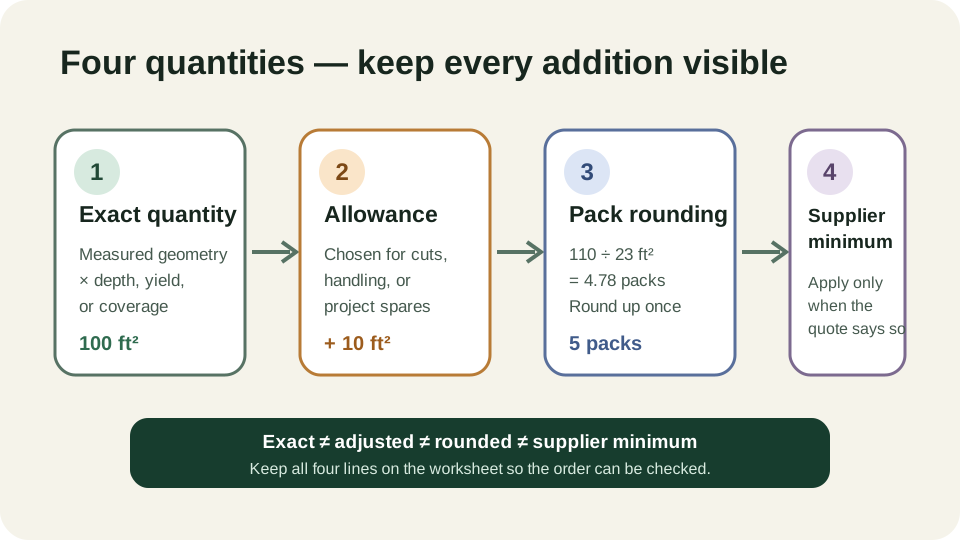
Allowance is not the same as whole-package rounding or a supplier minimum. Those are later purchasing constraints. Keeping all four stages separate prevents a rounded order from being described as if it were the measured requirement.
| Stage | Calculation | Who or what governs it |
|---|---|---|
| 1. Exact quantity | Measured geometry × depth, thickness, or coverage | Field measurements and project scope |
| 2. Project allowance | Exact quantity × chosen allowance % | Layout, condition, cut plan, handling, installer or project decision |
| 3. Package / increment rounding | Round adjusted quantity up to whole packs, bags, boards, cans, or order increments | Product package or supplier selling unit |
| 4. Supplier minimum | Increase the rounded order only if the seller requires it | Current supplier quotation |
A calculator should show each addition separately. Do not apply a second hidden allowance after a supplier or estimator has already included one.
Worked example: 100 ft² of flooring sold in 23 ft² packs
Suppose a measured floor is exactly 100 ft² and the project decision is a 10% allowance. The adjusted coverage is 100 + 10 = 110 ft². A pack covers 23 ft², so the unrounded pack count is 110 ÷ 23 = 4.78 and the purchase is 5 whole packs.
Five packs cover 115 ft². The order therefore contains 10 ft² of explicit allowance plus another 5 ft² created by whole-pack rounding. Reporting only 115 ft² would hide why those two additions exist.
| Line | Example | Your project |
|---|---|---|
| Exact measured quantity | 100 ft² | |
| Chosen allowance | 10% = 10 ft² | |
| Adjusted quantity | 110 ft² | |
| Package coverage | 23 ft² | |
| Unrounded packages | 4.78 | |
| Whole packages to buy | 5 | |
| Coverage after package rounding | 115 ft² |
Choose the allowance from the job, not from a universal table
Different materials lose quantity for different reasons. Tile and flooring depend heavily on layout and cuts; concrete and loose landscape materials depend on formed or excavated geometry; paint depends on the product label, coat count, surface and container rounding. A percentage copied from an unrelated job can be less accurate than a measured cut plan.
| Material | Exact quantity starts with | Allowance questions | Separate purchase rounding |
|---|---|---|---|
| Tile | Tiled area ÷ effective tile footprint | Pattern, perimeter cuts, breakage, matched spares | Whole tiles, then whole boxes |
| Plank flooring | Net floor area | Board direction, stagger, awkward cuts, matched spares | Whole packs |
| Concrete | Formed volume | Uneven base, over-excavation, spillage | Supplier volume increment / minimum |
| Gravel, mulch, topsoil | Area × finished depth | Settlement, compaction basis, irregular edges, handling | Bulk increment or whole bags |
| Boards and trim | Rows or linear run | Stock length, seam plan, end cuts, defect/cut policy | Whole stock lengths |
| Paint | Paintable coat-area ÷ label coverage | Surface condition and touch-up plan | Whole cans for each finish |
The table identifies decisions; it does not prescribe percentages. Use the project documents, product instructions, supplier rules and installer plan.
Pre-order allowance checklist
Write down each decision before using the calculator. That creates an auditable shopping list and makes supplier or contractor changes easy to compare.
- Exact dimensions and units checked against the measured project.
- Areas or openings outside the material scope deducted once, not twice.
- Allowance percentage and its reason written beside the quantity.
- Product coverage, yield, stock length, or pack size copied from the exact item being bought.
- Whole-package or supplier-increment rounding shown separately.
- Supplier minimum, delivery quantity, and return policy confirmed from the current quote.
- No second allowance added by another estimator without reconciling the first one.
Same project
Related measurement guides
Sources and limits
Check the project-specific details
- NIST — SI Units: Length — Exact unit definitions used when measured quantities are converted before allowance and package rounding.
- MAPEI — Tile Grouts Calculator — Manufacturer example showing why coverage depends on the exact product, tile and joint inputs rather than one universal material allowance.
Review status: Measurement workflow and exact unit conversions checked editorially; project choices and material allowances pending human trade review.
This guide supports planning only. It does not specify structural design, code compliance, or a supplier quotation.