Landscaping
Landscaping Calculator — Multi-Zone Material Planner
Measure up to six landscape zones, keep unlike materials separate, and turn supplier coverage or sale increments into an auditable purchase plan.
Formula tested · Local units · No sign-up
Multi-zone workspace
Build one supplier-ready landscape takeoff
Add up to six material zones. Each keeps measured quantity, your allowance, and purchase rounding separate.
Show the calculation methodFormula, conversions, rounding, and assumptions+
Start with plan area. A rectangle is length × width; a circle is π × (diameter ÷ 2)². For an irregular zone, split it into non-overlapping shapes or enter a known net area after deductions.
Bulk-material volume in cubic yards = area in square feet × finished depth in feet ÷ 27. Depth in inches is divided by 12 first. This is a volume result, not a weight estimate.
Chosen allowance = exact quantity × allowance percentage. The calculator reports exact quantity, allowance and quantity after allowance separately so a supplier can audit the basis.
If the supplier sells bulk material in a stated cubic-yard increment, the allowance-adjusted volume rounds up to that increment. The added amount is shown as supplier-rounding surplus, not hidden inside the allowance.
For sod or another area product, whole purchase units = quantity after allowance ÷ the exact product coverage, rounded up. If coverage is unknown, the calculator leaves purchase units pending instead of inventing a pallet or roll size.
A material cost appears only when you enter the relevant current price. Different physical units are never combined into a fake project quantity; only priced monetary lines can form a partial material subtotal.
Real-world example
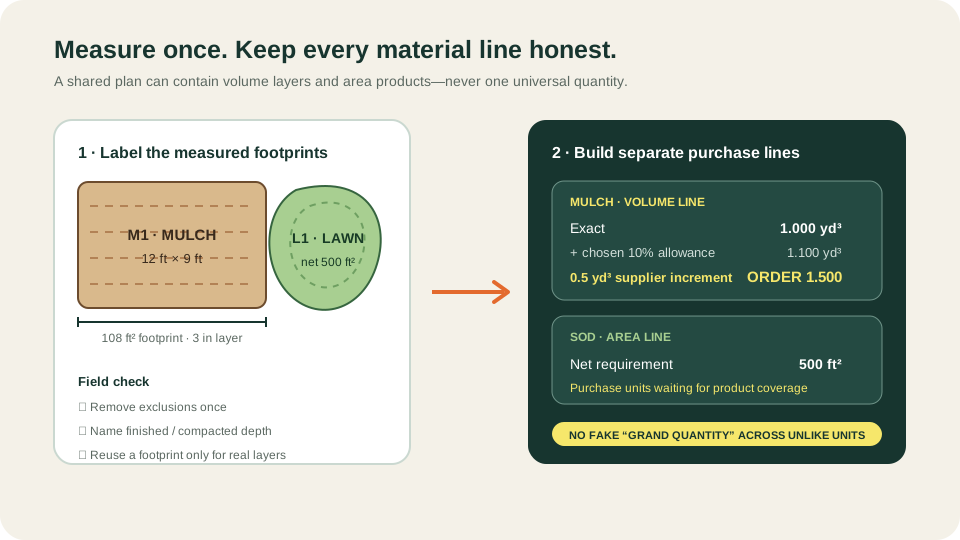
Checked example: mulch bed plus net lawn
- Mulch bed area: 12 ft × 9 ft = 108 ft².
- Convert mulch depth: 3 in ÷ 12 = 0.25 ft. Exact volume: 108 × 0.25 ÷ 27 = 1.000 yd³.
- Chosen 10% mulch allowance: 1.000 × 10% = 0.100 yd³, so 1.100 yd³ is required after allowance.
- At the entered 0.5 yd³ supplier increment, 1.100 yd³ rounds up to a 1.500 yd³ order. The 0.400 yd³ difference is increment-rounding surplus.
- The lawn is already measured net of the patio at 500 ft². With 0% allowance, the required sod coverage remains 500 ft².
- Because no supplier roll or pallet coverage is entered, the sod purchase-unit line remains pending. The calculator does not add 1.500 yd³ of mulch to 500 ft² of sod.
Order planning can proceed for 1.5 yd³ of mulch at the stated increment. The sod line is correctly held at 500 ft² until the selected product's coverage is known.
Before you start
How to measure
- Sketch the project and give every non-overlapping surface a zone code. Measure rectangles and circles directly; split irregular outlines into smaller shapes and subtract patios, buildings, ponds or other areas outside scope once.
- Use “Reuse this footprint” only for real layers over the same measured area, such as soil below mulch. Keep each layer on a separate line because depth, material behavior and purchase unit differ.
- For bulk material, enter the finished depth required by the job. Do not silently substitute loose delivery depth, compacted depth or settlement allowance; confirm the correct basis for the selected material.
- Copy the cubic-yard sale increment, roll coverage, pallet coverage and unit price from the exact supplier quote. Leave an unknown field blank—the workspace will mark the purchase result pending.
- Before ordering, reconcile every zone code against the plan and walk the site for access, drainage, slopes, buried services and delivery locations that arithmetic alone cannot resolve.
Local guidance
Notes for United States
- This US workspace uses feet, square feet, inches and cubic yards. Prices are optional USD inputs and no tax, delivery, minimum load or deposit is assumed.
- Mulch, soil, gravel and sand remain volume estimates. A tons result requires a supplier-specific loose or compacted density and is better handled in the relevant specialist calculator.
- Sod and custom area products use the exact coverage stated for the selected roll, slab, pallet or package. Product coverage is not universal.
Quick reference
Which landscape quantity should remain separate?
| Material type | Measured basis | Purchase input to confirm |
|---|---|---|
| Mulch / topsoil | Area × finished depth → yd³ | Bulk increment, bag volume or supplier minimum |
| Gravel / sand | Area × specified depth → yd³ | Bulk increment; supplier density only if ordering by weight |
| Sod / turf | Net surface area → ft² | Coverage per roll, slab or pallet |
| Pavers | Layout and installed unit size | Pieces per package plus separate base and bedding layers |
Use the related specialist calculators when bags, weight conversion, paver layout or product-specific layers are needed.
Good to know
Common mistakes to avoid
- Adding cubic yards, square feet and package counts into one project total. These are unlike units; compare them as separate order lines.
- Multiplying square feet by an inch value without converting inches to feet first, which overstates volume by 12 times.
- Counting overlapping footprints twice when they are alternative finishes, or deleting a valid layered footprint because two materials share the same area.
- Treating allowance and supplier rounding as the same thing. Allowance covers the selected planning risk; order rounding is imposed by the purchase unit.
- Guessing pallet coverage, density, bulk increment or price. Use the exact selected product and current quote or leave the purchase line pending.
Need help?
Frequently asked questions
What does this landscaping calculator calculate?
It calculates plan area for each zone, cubic-yard volume for bulk layers, square-foot requirement for area products, a separately stated allowance, optional supplier rounding and optional cost from prices you enter.
Can I calculate mulch, soil, gravel and sod together?
Yes. Add one line per material zone or layer. The workspace keeps cubic yards, square feet and purchase units separate while allowing priced lines to contribute to a monetary material subtotal.
How do I calculate an irregular landscaping area?
Divide it into rectangles or circles that do not overlap, subtract known exclusions, then enter the resulting net square feet as a known area. Keep your sketch and zone labels so the net area can be checked.
Does the calculator convert gravel or soil cubic yards to tons?
No. Weight depends on the selected product's density and, for some work, its loose or compacted state. Use a supplier density in the relevant gravel or topsoil calculator rather than applying a universal factor.
Why does a purchase line say waiting for supplier coverage?
The measured square feet are complete, but whole rolls, pallets or packages cannot be calculated honestly until the exact product coverage is entered.
Keep planning
Related calculators
Measure with confidence
Planning guides for this project
Transparency
About this calculator
- Written by:
- BuildMeasure Editorial Team
- Technically reviewed by:
- Pending independent technical reviewer (formula unit-tested; see methodology)
- Last reviewed:
- 2026-07-23
- Formula version:
- 1.0.0
- Region reviewed for:
- United States
- Spotted an error?
- Report a correction
Methodology
- Each project line is calculated independently. Rectangle, circle and known-area modes share one square-foot area basis before the material-specific formula begins.
- Bulk volume uses the exact relationship 1 cubic yard = 27 cubic feet. Area × depth is evaluated in cubic feet, then divided by 27.
- Allowance is applied once to exact quantity. Supplier increments and whole coverage units round up only after allowance and are exposed as separate values.
- The calculation never supplies a default density, compaction factor, coverage, order increment, price, delivery charge or tax. Missing purchasing data remains visibly pending.
- Automated tests cover the hand-checked mulch-and-lawn example, supplier increment and coverage boundaries, circle geometry, partial cost totals and invalid inputs. Formula version appears on the page.
Sources & standards
- NIST — SI Units: Length: Official exact foot and inch definitions used for dimensional consistency.
- NIST — Revised Unit Conversion Factors: Official US customary and SI conversion references; the calculator retains US customary output for this page.
- University of Minnesota Extension — Mulching and garden health: Horticultural context for mulch placement and site decisions that are outside a volume formula.
- Penn State Extension — Lawn establishment: Site-preparation and lawn-establishment context beyond a square-foot material takeoff.
- Concrete Masonry & Hardscapes Association — Paver systems: Technical context showing why paver units, base and bedding layers should not be collapsed into one generic landscape quantity.
This calculator is a planning takeoff, not a landscape design, engineering assessment or supplier quotation. It does not determine grading, drainage, soil suitability, structural sections, compaction, settlement, density, buried-service clearance, labor, equipment, disposal, permits, delivery access or product compatibility. Confirm the measured scope, material specification, purchase units, fees and site conditions with the relevant supplier and qualified professional before ordering or building.